

Search The Knowledge Base
Visit Dates in Mentor EDC
Click in the Navigation Tree to select a Subject record. A “Selection Required” message displays if no record is selected.
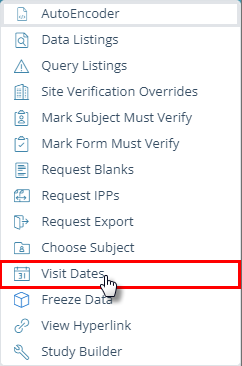
Click the tools button (wrench icon at top of screen) to open the menu and click to select Visit Dates.
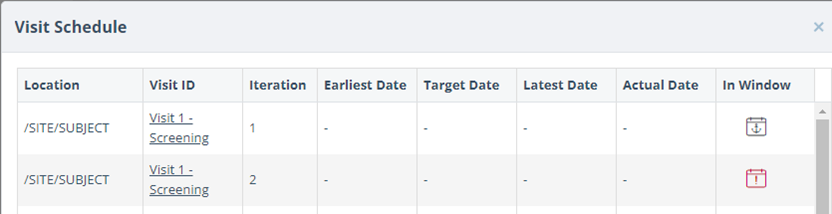
The Visit Schedule dialog box for the selected Subject displays details.
Optionally, click on a link in the Visit ID column navigate to the status details screen.
The table below provides descriptions for the EDC Visit Dates field names.
| Field Name | Description |
| Location | Study Tree Location detail displays in this column. |
| Visit ID | This ID is the Identifier of the Visit from the Visit Schedule established by the study protocol. |
| Iteration | This number is the Iteration of this folder if it is a repeatable folder. |
| Earliest Date | This date is the earliest date that the subject visit may occur during the established Visit Schedule Window. |
| Target Date | This is the ideal Visit Date for a subject visit according to the Visit Schedule listed in the protocol. |
| Latest Date | This date is the latest date that the subject visit may occur during the established Visit Schedule Window. |
| Actual Date | This date is the actual date that the Subject visited the site. |
| In Window | This column notifies you whether the subject visit was at the site within the established Visit Window timeframe. The anchor date is the date from which all other visit dates derive. The anchor date will display a calendar icon in this column. |
