Search The Knowledge Base
User Access and Training Data Report in Mentor EDC
- This feature displays for permissioned users; the Training Data Report permission must be assigned.
- The User Access and Training Data report is a Site Level Report for Training Records.
- To review a video that shows this feature, click this link User Access and Training Data Report in Mentor EDC.
- Refer to User Access Report in EDC as needed for information about that EDC option.
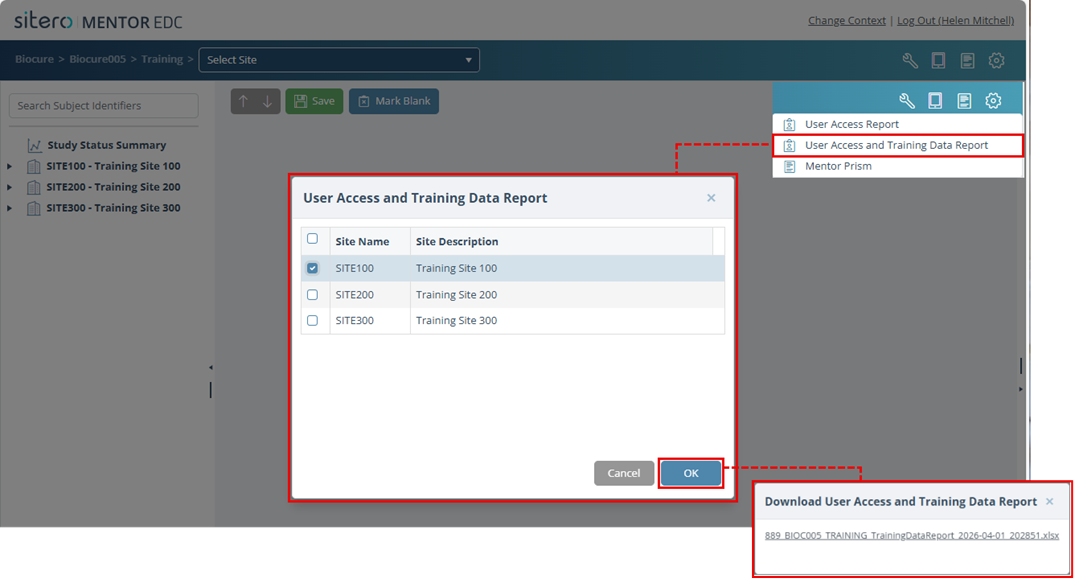
- Click the Reports button (paper symbol) in the header to open the menu and click to select User Access and Training Data Report.
- The dialog box displays options for your selection.
- Click in one or more check boxes to select the Site(s) to be included in your report.
- Click the OK button. The system displays an onscreen message while in progress, then displays a link when the report is ready.
- Click the link to download the file. Access the file in the location where your system stores downloads.