Search The Knowledge Base
View Hyperlink for a Form in Mentor EDC
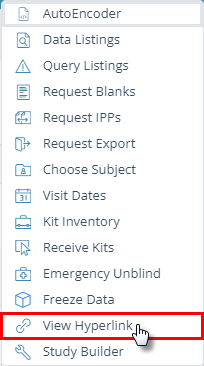
The View Hyperlink button is a feature that allows you to copy (to the clipboard) the hyperlink of the current form you are viewing, allowing you to paste it in an e-mail or to document it for reference or sending to another user.
When a permissioned user clicks on the hyperlink, the system opens to display the form associated to the hyperlink.
- Click to select/open a form.
- Click the Tools button (wrench) to display the menu then click to select the View Hyperlink button.
- A dialog box displays the selection’s hyperlink.
- Copy the link/hyperlink.
- Place your cursor in the box with the hyperlink, click Ctrl + C on your keyboard, then paste the copied text, as appropriate. – OR – Place your cursor in the box with the hyperlink, “right click” to open a menu, click to select copy, then paste the copied text, as appropriate.
- Click the OK button to close the View Hyperlink dialog box.