Search The Knowledge Base
System Timeout and Automatic Sign-Out in Mentor CTMS Visit Report Library
When working in the Visit Report Library (CTMS [category], Site Monitoring menu option) after a set amount of time, the system will automatically end the session, and you will be automatically Logged Out.
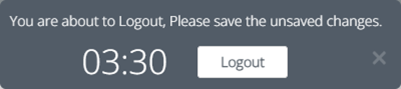
If the session ends when you have unsaved changes, those changes will not be saved. A countdown clock displays the amount of time remaining before the system ends the session.
- In the Report Editor: After a set amount of time, the system will automatically end the session, and you will be automatically Logged Out.
- A countdown clock displays the amount of time remaining before the system ends the session.
- You can click the small “x” at the right side of the message to close the notification.
- Sitero recommends saving your changes and logout from the User menu, you can immediately log in to continue working in the system.
- If you use the Logout button prior to saving your changes OR if the system Logout occurs automatically, log in to CTMS from the same browser in which the automatic timeout occurred and the system will prompt you to save changes from the previous session.
- When the system Logout occurs automatically, and you have unsaved changes and then log in using a different browser, unsaved changes are lost and cannot be retrieved.