

Search The Knowledge Base
Mentor CTMS Portal
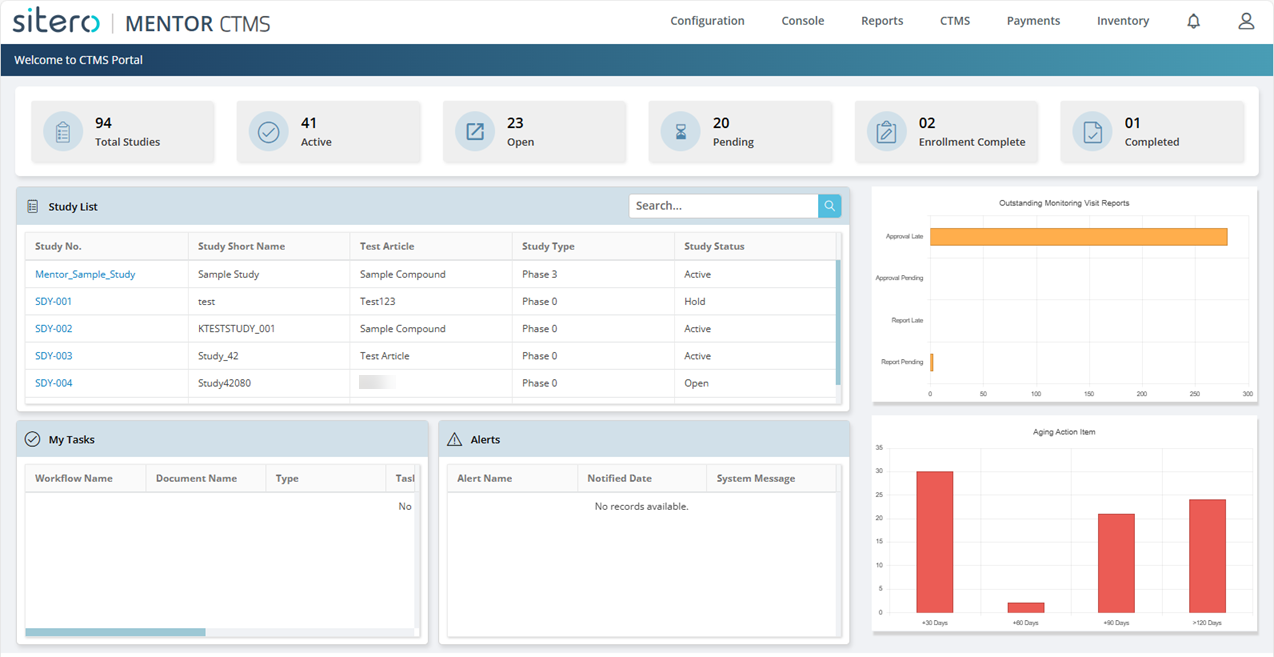
- The CTMS Portal screen may display upon initial log in to the system. Based on your permissions, you may see tiles (with links to additional information), charts, graphs, and summary information.
- Click a link in the Study List tile to navigate directly to the CTMS Dashboard screen.
- Click the logo (top left) to return to this screen.
- Refer to Mentor CTMS User Menu for additional information and details about features that are available throughout the system.
- REMEMBER: Your CTMS environment includes the “Mentor_Sample_Study” for UAT, Training Purposes, etc. which does not get counted in the Total Studies details that display at the top of your CTMS Portal screen, metrics, and the graphs that display on the right.

Getting Started in this System
Configure the system to fit your needs.
Refer to Getting Started in CTMS for step-by-step instructions. Contact your project manager for additional information.
Remember: You must perform the Getting Started tasks in the sequence listed in the article.
