

Search The Knowledge Base
Study Configuration Process in Mentor Payments
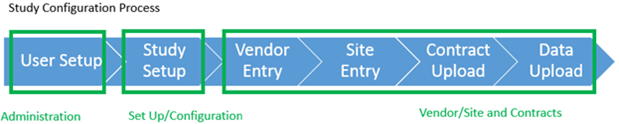
The diagram below shows the three (3) distinct processes that are configured by the system administrators when setting up a study in the system.
User Setup
- User Setup defines roles and permissions.
- Roles are then used to create users who inherit the permissions assigned to the role.
- Roles help ensure that study duties are segregated so that appropriate controls are in place and that users are easily created.
- Refer to the Create Users section in Administration Details for additional information.
Study Setup
- Study Setup defines the relationship between the negotiated contracts with study sites and the study data that the sites provide, allowing the system to understand the structure of the data in the clinical trial.
- The payable line items from the contracts are evaluated to identify what data points will need to be completed for the line items to trigger in the system for payment processing.
- The study structure is entered into the system in the form of assessments, case report forms (CRFs), and procedures.
- The specific data points that will be used for payments are associated with the study by mapping the CRFs and procedures to the assessments.
Vendor Entry
- In Vendor Entry, the Payees of the Site Contracts are entered into the system.
- Payee information includes details such as:
- Payee information (Display name, legal name, address, for example)
- Financial contact information
- Payment method preferences
- Bank account information (required for electronic payment)
Contact your Project Manager to discuss using the ClinConnect method for uploading entries, instead of using the manual entry system.
Site Entry
- All Sites participating in the Study must be entered into the system and invited to the study in order to establish a link between the Site and Data that comes into the system.
- To create a Site, a Study-specific Site Number and Principal Investigator are entered into the system.
Contact your Project Manager to discuss using the ClinConnect method for uploading entries, instead of using the manual entry system.
Contract Entry
- Contracts in the system establish the relationship between the Vendor and the Site, as well as defines the payable line items for the site negotiated contracts.
- Contracts can be entered after the study is set up and vendors and sites are in the system.
- Each contract in the system contains the set of payable line items and each line item includes a payment trigger, called a CML (Contract Meta Language)*, which describes what conditions in the data must be met for the line item to be paid. For example, the site may need to complete a set of specific CRFs for the vendor to be paid for a contracted visit.
- Each contract line item will also include payment related settings. For example: These settings define if an invoice is required, and the payment terms for that line item. After a contract has been entered, it is published in the system. Publishing allows the contract terms to be evaluated against the data.
*CML – Contract Meta Language: the language that connects the study data with contract terms to identify the exact conditions for contract terms in a CTA to trigger and create a transaction.
Data Upload
- In the data upload step, all study data is uploaded to the system.
- When the data is uploaded, the system uses the configuration entered in Study Setup, as well as the payment triggers in the published contracts to programmatically determine what contract line items are payable based on the data.
- The payable line items are then displayed in the Clinical Review screen for review and approval.
