

Search The Knowledge Base
Contact Support for Sitero Products
- To ensure the fastest and most effective resolution to your Support requirements, please contact the Support Center 24 hours a day, 7 days a week by clicking Sitero Customer Support OR using the information below.
- The Customer Support site displays telephone numbers for multiple countries.
In the US and Canada, dial 1-877-558-2783.
- If you require immediate assistance with logging in or using/resetting your password for a Sitero product, send an email to Support@Sitero.com. Make sure to include accurate contact information including a phone number.
- Refer to the information below for step-by-step details about opening a Support ticket from this support site OR from the Sitero website.
- On the Support site, scroll to view a table of telephone numbers, listed by country OR fill in the required and optional fields to open a support ticket – refer to the details below for additional information.
Follow the steps below to Contact Support from this site.
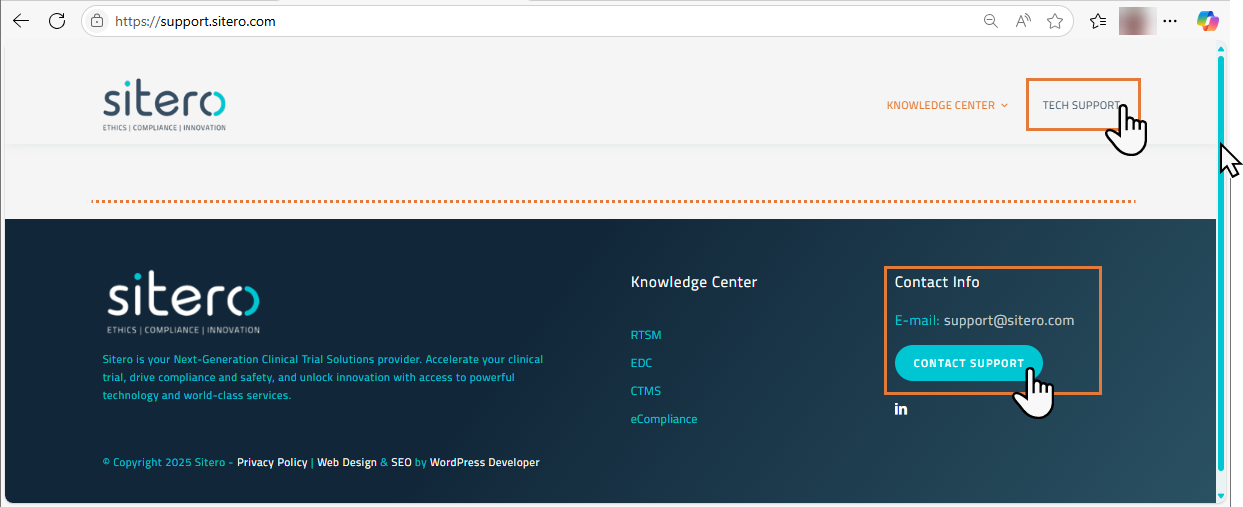
- Click the TECH SUPPORT button at the top of the screen (right side) OR click the CONTACT SUPPORT button at the bottom right of the screen.
- The Customer Support page opens in a new browser window.
- Scroll to see a table listing the contact Phone Number by Country.
- To open a Customer Support ticket, scroll down the page and populate the required and optional fields.
- You may attach a file, if applicable. Maximum file size is 100 MB.
- Click in the “I’m not a robot” check box.
- Click the Send button.
- Optionally, you may send an email to Support@Sitero.com.
Follow the steps below to Contact Support from the Sitero website.
- Open a browser window and enter Sitero.com in the URL bar.
- Hover over the Contact button (top right) to display options.
- Click to select Customer Support.
- The Customer Support page opens in a new browser window.
- Scroll to see a table listing the contact Phone Number by Country.
- To open a Customer Support ticket, scroll down the page and populate the required and optional fields.
- You may attach a file, if applicable. Maximum file size is 100 MB.
- Click in the “I’m not a robot” check box.
- Click the Send button.
- Optionally, you may send an email to Support@Sitero.com.


